Live weather alarm-Radar
App MusingsTools
3.6238.00 Reviews
- Version
- 1.9.1
- Installs
- 100.00K
- Age Rating
- Everyone
Screenshots
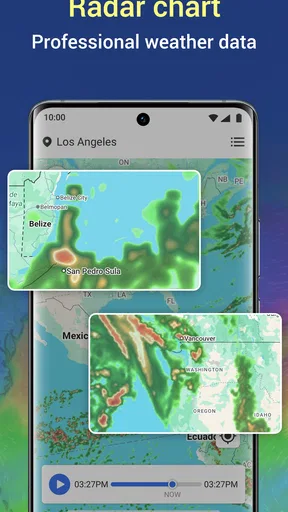
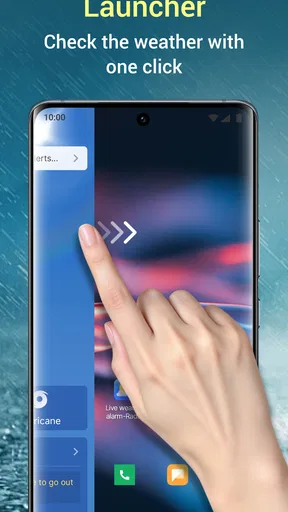
Our Review of Live weather alarm-Radar
 Analysis by Appyee
Weather apps usually ask for attention at exactly the wrong moment: when I am leaving home, planning a drive, or trying to decide whether an outdoor plan is still sensible. Live weather alarm-Radar takes a narrower and more practical approach. It is a free tools app from App Musings built around weather alerts, so I approached it less like a full forecasting dashboard and more like a small assistant that should help me notice changing conditions in time.
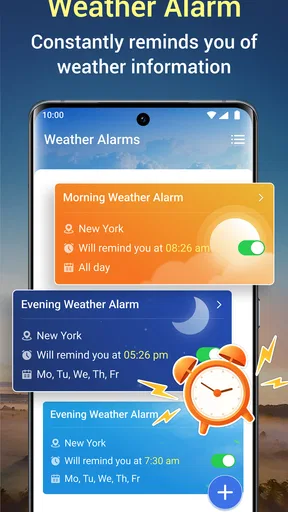
That distinction matters. I would not choose it expecting a complete replacement for a detailed meteorological service. I would choose it when the useful question is, “Do I need to know if the weather is about to become a problem?” The app’s store summary calls it a weather assistant, while its short description focuses on a live weather alarm. In everyday use, that makes the alarm concept more important than decorative maps or endless forecast panels.
My overall impression is that its value depends on how much you want weather information to come to you rather than checking it manually. That can be genuinely helpful, but it also means the quality of the experience rests on clear setup, sensible notification behavior, and your willingness to review the choices the app presents instead of accepting every alert automatically.
How the app fits into a careful weather routine
I see Live weather alarm-Radar as a companion for people who already have a routine around changing weather. A commuter might use it before cycling to work, a parent might check it before a school pickup, and someone who works outdoors might want an early warning before loading equipment into a vehicle. These are not dramatic use cases; they are small decisions where a timely warning can save inconvenience.
One realistic scenario is a morning walk followed by errands. Instead of opening a conventional forecast app several times, I would set up the weather assistant before leaving and pay attention to whether an alert changes my plan. If rain or another significant change is approaching, the alarm can prompt me to take a jacket, delay the walk, or choose the car. The benefit is not that it eliminates uncertainty. It gives the uncertainty a place in my routine.
That is also where I would keep expectations realistic. A live warning is not the same thing as a guarantee. Weather changes quickly, local conditions can differ from a broader forecast, and an alarm is only useful if the device allows it to reach me. I would treat the app as one input in a decision, not as permission to ignore the sky, road conditions, or official emergency guidance.
The app is aimed at a broad audience: its content rating is Everyone, and it runs on Android versions from 8.0 onward. That makes it accessible for people using older devices, although compatibility alone does not tell me whether every phone will handle background alerts in the same way. Battery optimization, notification settings, and manufacturer-specific restrictions can all affect an alarm-style app, so I would test it during an ordinary day before relying on it for an important trip.
App Musings has positioned this as a focused tool rather than a large weather ecosystem. That focus is useful if I dislike crowded interfaces and only want a warning mechanism. It is less attractive if I want a deep history of forecasts, extensive climate information, or a single app that also handles radar analysis, widgets, travel planning, and severe-weather education.
What I would check immediately after installing it
My first step would be to inspect the initial setup instead of rushing through it. I would look for the location choice, the types of weather events that can trigger an alarm, and the controls for notification timing. These choices determine whether the app feels helpful or noisy. An alarm that fires for every minor change can quickly become background clutter, while one that is too narrowly configured may not be useful when plans change.
I would also check whether the app lets me use a manually selected location or whether it expects ongoing location access. That is an important trust question for any weather tool. If I am using it for one town, a fixed location may be more comfortable than allowing continuous access. If I travel between places, automatic location may be convenient, but I would want to understand when it is active and how easily I can turn it off.
These are not merely privacy preferences. They change the practical behavior of the product. A manually chosen location can reduce surprises when I am near a boundary between areas. Automatic location can make the app more useful on a trip but may require more attention to system permissions and battery behavior. I would choose the least intrusive option that still matches my routine.
The current release is version 1.9.1, and the app has passed the early trial stage in the store, with over one hundred thousand installs. Its average rating is 3.6 from roughly a thousand ratings, alongside a couple hundred written reviews. I read that combination as a reason to try it with curiosity rather than assume it will suit everyone. There is enough adoption to make the app worth evaluating, but the middling average suggests that setup, alerts, or individual expectations may matter a lot.
Trust begins with visible choices, not the weather screen
For me, the first trust test is whether the app makes its requests understandable. A weather alarm may need access to location or notifications, but I want each request to appear at a sensible moment, with a clear reason. If a permission prompt arrives before I understand what the app is doing, I would pause and decide whether the feature is important enough to justify it.
I would also open the Android permission manager after setup and review the result there, not just inside the app. This gives me a second view of what the phone has allowed. If I later stop using the alarm, I can revoke access without needing to search through the app’s menus. That habit is especially useful on an older phone where background behavior may be less predictable.
The same principle applies to notifications. I would leave only the alert categories that support my actual needs and silence informational messages that do not help me make a decision. Android’s notification controls can be more precise than an app’s own switch, so I would use both. The goal is not to block everything; it is to make sure an important alarm is distinguishable from routine updates.
I would be careful with account expectations as well. If the app offers any sign-in or synchronization choice during use, I would ask myself whether it is necessary for the weather routine I want. A simple local setup is preferable to creating an account for a feature I will never use. If I decide to stop using the app, I would check the app settings and Android settings for a straightforward way to disable alerts, remove permissions, and clear its stored information from the device.
That approach keeps control in my hands without making claims about practices I cannot see directly. I do not assume that a weather app is harmless simply because its purpose is ordinary. Location and notification choices can still reveal patterns about where I go and when I am active, so I treat them as decisions worth reviewing.
The moments when data choices matter most
Location becomes more sensitive when I use the app away from home. A weather alarm may be convenient during a holiday or business trip, but that is also when I am moving through unfamiliar places and may be less attentive to permissions. Before enabling automatic location for travel, I would decide whether the convenience is worth it. For a short visit to one city, selecting the location manually may be the better compromise.
Another sensitive moment is when the app runs in the background. An alarm is useful precisely because I do not have to keep the screen open, but background operation can interact with battery controls and system permissions. I would check the phone’s battery settings if alerts seem delayed, then decide whether unrestricted background activity is justified. I would not automatically grant every exception, especially if I use the app only occasionally.
There is also a practical trade-off between privacy and precision. A fixed location may be enough for a home-to-work routine, while a moving location can better match a road trip. I would not leave the more expansive option enabled permanently just because it is convenient once. I would switch modes according to the trip, then return to a simpler setup afterward.
Notification content deserves attention too. If an alert appears on a locked screen, it may reveal that I am monitoring weather at a particular place or time. I would adjust lock-screen visibility if that matters to me, especially on a shared device. This is a small setting, but it shows why user control should include not only whether an alarm arrives, but also how much of it is visible before unlocking the phone.
For families, the Everyone rating is reassuring from an age-access perspective, but I would still configure the app personally on a child’s or shared device. Weather alerts can be useful, yet repeated alarms may cause confusion if several people use the same phone. I would select a clear location and a restrained notification setup rather than assuming the default arrangement will fit every household.
How I would make the alarms useful instead of annoying
The best workflow is to connect an alert to an action. Before a cycling commute, I would decide in advance what would make me change route or clothing. Before an outdoor job, I would decide when to postpone loading materials. This prevents the app from becoming a stream of warnings that I read without changing anything.
I would also avoid testing it only on a calm day. A quiet period tells me little about whether the alarm is understandable. I would use it across different parts of my routine, checking whether the wording arrives early enough for the decision I need to make and whether the notification is easy to distinguish from other phone messages. If the app provides adjustable thresholds, I would begin conservatively and refine them after seeing how often they interrupt me.
A useful trick is to pair the app with a quick manual check rather than replacing one with the other. I might glance at the wider forecast in the morning, then let the alarm handle changes while I am busy. This division of labor is more sensible than asking an alert tool to provide every detail or asking a detailed forecast app to monitor my day continuously.
I would keep a backup habit for high-consequence situations. For a long drive, an outdoor event, or dangerous conditions, I would consult official local guidance and road information as well. Live weather alarm-Radar can support a decision, but I would not make it my only source when safety is at stake. That is not a criticism unique to this app; it is the correct limit for any automated weather notification.
Where it differs from ordinary weather apps
Most conventional weather apps are built for browsing. I open them, search for a location, compare hourly conditions, inspect a radar layer, and decide what to do. Live weather alarm-Radar appears more focused on the opposite direction: the app watches the configured situation and tries to bring a relevant change to my attention.
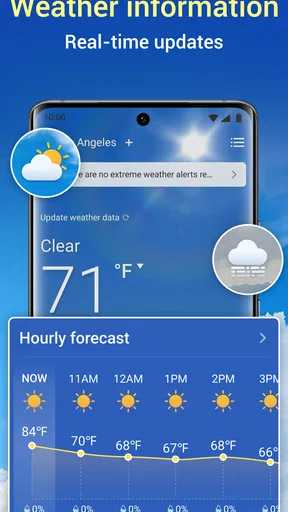
That difference makes it complementary to a detailed forecast app. If I want to compare several locations, study an hourly temperature curve, or watch a storm system visually, a traditional weather service will probably be better. If I already know the location and mainly want a warning that prompts me to reconsider a plan, this focused tool may be less distracting.
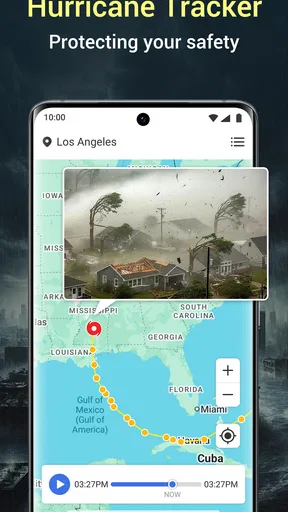
The trade-off is depth. A radar-centered experience can help me interpret movement and coverage, while an alarm-centered experience is better at reducing the need to keep checking. I would choose the former for active storm tracking and the latter for routine monitoring. Someone who enjoys exploring maps may find the focused design too limited; someone who finds weather dashboards overwhelming may appreciate its narrower purpose.
I would also compare it with the basic weather information already built into a phone. System weather panels are convenient for quick checks, but they may not match the workflow of a dedicated alarm. On the other hand, if all I need is the current temperature before leaving home, installing another tool may add unnecessary complexity. The app earns its place only when its alert behavior saves me repeated checking.
Its free price removes the financial barrier to trying that workflow, which is helpful when the right fit depends on personal notification habits. Still, “free” does not mean costless in practical terms. My attention, battery, permissions, and tolerance for interruptions are the real costs I would evaluate during the first few days.
Who should use it, and who should skip it
I would recommend trying it if you often make plans around weather but forget to check the forecast again later. It is particularly suitable for commuters, walkers, outdoor workers, caregivers arranging pickups, and anyone who wants a prompt before conditions disrupt a routine. The app’s broad age rating and support for older Android versions also make it a reasonable candidate for shared or older devices.
I would be more cautious if you need professional-grade weather interpretation. People who plan aviation, marine activity, mountain travel, or other high-risk work should use specialized and official sources rather than depending on a general consumer alarm. Likewise, if you want a rich radar map, long-range comparison, widgets, or extensive historical context, a full-featured weather platform may serve you better.
I would also skip it if I am unwilling to review notification and location permissions. An alarm app cannot be both useful and completely invisible to the phone’s permission system. If I do not want background alerts or location-related choices, a manual forecast app is likely a better match.
For anyone concerned about privacy, my advice is simple: start with the narrowest setup, use a fixed location where practical, keep notification visibility controlled, and revisit permissions after a week. That gives me a meaningful trial without handing over more access than my routine requires. If the app does not provide enough control for that arrangement, I would remove it rather than compromise my preferences.
My cautious verdict after weighing the trade-offs
Live weather alarm-Radar has a clear reason to exist. It is not trying to win me over with a giant collection of weather screens; its appeal is the possibility of a timely prompt when I am busy with something else. For a person whose main problem is forgetting to check changing conditions, that can be more useful than another beautifully designed forecast page.
At the same time, I would not install it and immediately treat every alarm as authoritative. I would test the setup, review the location and notification choices, watch how the phone handles background activity, and compare alerts with a trusted forecast during normal use. Those steps are especially important because the app’s average rating of 3.6 shows that the experience is not universally effortless, even though it has reached more than one hundred thousand installs.
The free model makes experimentation easy, and the Everyone rating broadens its potential audience. Its current version, 1.9.1, is the one I would evaluate rather than assuming that an older impression still applies. My recommendation is therefore conditional but positive: try it if you want a focused weather alarm and are comfortable managing permissions deliberately.
I would recommend Live weather alarm-Radar as a practical reminder tool, not as my only weather authority. It is strongest when attached to a specific daily decision, such as whether to cycle, walk, travel, or work outside. It is weakest when I expect a complete forecasting suite or when I want to avoid all background access and notification management. Used with those boundaries, it can earn a useful place in a weather routine without taking control away from me.
Verdict
Strengths of Live weather alarm-Radar
- Real-time radar makes approaching rain and storms easy to spot.
- Custom weather alerts help users prepare before conditions change.
- Clear map interface is quick to understand at a glance.
- Useful for planning commutes, trips, and outdoor activities.
- Supports location-based forecasts for more relevant local updates.
Limitations of Live weather alarm-Radar
- Frequent alerts may become distracting during unstable weather.
- Radar accuracy can vary by region and available weather stations.
- Some advanced features may require a paid subscription.
- Live map data can consume extra battery and mobile data.
- Forecasts may be less reliable during rapidly changing conditions.
Similar Picks in This Category
View All
Google LLC4.0

Gboard - the Google Keyboard
Google LLC4.5

Google Play services
Google LLC4.3

Google Play Store
Google LLC4.9

Files by Google
Google LLC4.5

SHAREit: Transfer, Share Files
Smart Media4U Technology Pte.Ltd.4.3
Frequently Asked Questions
What is Live weather alarm-Radar, and what does it do?
Live weather alarm-Radar is a weather application designed to provide current conditions, forecasts, radar imagery, and severe-weather alerts in one place. During testing, its main value was the ability to check approaching rain, storms, and other weather changes visually instead of relying only on a written forecast. It can be useful for planning commutes, travel, outdoor activities, and daily routines.
Does Live weather alarm-Radar provide real-time weather alerts?
The app is intended to notify users about important weather developments, such as heavy rain, thunderstorms, strong winds, or other potentially dangerous conditions, depending on the selected location and available alert services. Users should enable notifications and location permissions if they want timely warnings. Alert coverage and accuracy can vary by country, local weather agencies, internet access, and the data sources used by the application.
Does the app require location permission to work properly?
Live weather alarm-Radar can generally be used by entering or selecting a location manually, but location access may make the experience more convenient by automatically displaying weather conditions for your current area. If privacy is a concern, you can deny continuous location access and use a saved city instead. Review the permission request carefully, since background location and notification settings may affect automatic alerts.
Is Live weather alarm-Radar free to download and use?
The application may be available as a free download, but some features can depend on the version installed, advertising, or optional in-app purchases. Advanced radar layers, extended forecasts, ad-free usage, or additional customization may not be included in every edition. Before downloading, check the current Google Play or App Store listing for pricing, subscriptions, supported devices, and the exact features offered in your region.
Can I rely on Live weather alarm-Radar during dangerous weather?
The app can be a helpful supplementary source for monitoring radar images, forecasts, and notifications, but it should not be your only source during severe weather. Forecasts may change, radar data can be delayed, and alerts may depend on network connectivity or device settings. For emergencies, always follow official warnings from local authorities, national weather services, and emergency-management organizations.
